


Cannabis Product Photography for Weedmaps & Leafly: How to Increase Menu Conversions in 2026

Cannabis Product Photography for Weedmaps & Leafly: How to Increase Menu Conversions in 2026


When someone scrolls a menu on Weedmaps or Leafly, they’re not reading first — they’re scanning thumbnails. Your image either stops the scroll… or they swipe right past you to the next brand.
This post breaks down, in plain language, how to create cannabis images that actually convert on Weedmaps & Leafly, why it pays to start with a professional cannabis product photographer for your top SKUs, and the exact technical + creative decisions that move the needle. In this article we will discuss: Cannabis Product Photography for Weedmaps & Leafly: How to Increase Menu Conversions in 2026
Even outside cannabis, the data is blunt:
Around 67% of consumers say the quality of a product image is “very important” in deciding what to buy.
Surveys show up to 75% of online shoppers rely on product photos to make a purchasing decision.
One analysis found that high-quality product photos can drive up to a 94% higher conversion rate than low-quality photos.
80% of online shoppers rely on quality product photos and visual context to decide what to buy.

That’s e-commerce in general — now layer cannabis on top:
Your customer often can’t touch or smell the product beforehand.
Competition sits one thumbnail away on the same menu.
Many buyers don’t know your brand yet; images are the brand.
Even menu platforms themselves back this up. Weedmaps recommends clear, eye-catching custom photos and detailed descriptions to “close the sale” and highlights that high-resolution images and good data improve how customers perceive your listing.
Leafly’s documentation literally calls menu item photos “crucial” because they help customers visualize the products they’re interested in, and requires at least one photo per product on brand and retail menus.
In other words: if your menu images are weak, you’re paying for shelf space you’re not really using.
2. Start Where the Money Is: Your Top SKUs First
You don’t need to rebuild your entire menu overnight. The fastest, most profitable move is:
Hire a professional cannabis photographer to shoot your most reliable, highest-purchased SKUs first.
Think about:
Your top 20 products by revenue
Your top 20 products by order count
Any high-margin items you want to sell more of (concentrates, carts, rosin, premium eighths, solventless edibles, etc.)
Those SKUs are your digital end-cap. A small lift in conversion on those products creates an outsized revenue impact compared to polishing obscure SKUs that barely move.

A cannabis-specific photographer brings:
Lighting that flatters cannabis – no blown-out trichomes, muddy greens, or crushed blacks
Color accuracy – important when strain color is part of the appeal and when product appearance must match expectations
Macro detail – for flower, concentrates, and vapes, sharp trichomes and texture communicate quality control and potency
Compliance awareness – no consumption, minors, or questionable props that might violate Weedmaps/Leafly content guidelines
Consistency across the whole line – same angle, crop, and background so your menu looks like one brand, not a flea market
Professional cannabis photography doesn’t just “look nice.” In other industries, analyses of Shopify data and broader e-commerce studies have repeatedly found that improving product photos correlates with 30–90% lifts in conversion depending on the baseline quality.
If roughly 70–80% of your online sales come from 20–30% of your SKUs (which is common in retail), investing in that top slice first is the most efficient way to make Weedmaps & Leafly work harder for you.
3. What “Conversion-Ready” Images Look Like on Weedmaps & Leafly
Let’s get specific. Conversion-focused cannabis photos are not just “pretty.” They are:
3.1 Technically correct (platform-friendly)
Each platform has its own specs:
Weedmaps product images
Recommended around 800×800 px, 1:1 aspect ratio, 72 dpi, JPG or PNG.
For hero/brand imagery and ads, they provide asset kits with exact sizes for avatars, hero banners, and ad placements.
Leafly menu images
Recommends square images (e.g., 1600×1600 px) for menu items and requires at least one product image per item on brand and retailer menus.
If you frequently upload too-small, grainy images, the platform has to stretch them, and your product will look low-quality before anyone reads the description.
Checklist for technical readiness:
Cropped square (1:1) with plenty of breathing room
Minimum 800×800 px, ideally 1200–1600 px square for flexibility
File sizes compressed enough to load fast but not so aggressive they look crunchy
Clean, non-distracting background (more on that next)
3.2 Visually clean and easy to scan
When someone scrolls, their brain is answering three questions in under a second:
What is this? (Flower? Cart? Dab? Gummy?)
Does it look good/fresh/legit?
Is this the kind of product I’m shopping for right now?
To help them say “yes” fast:
Use simple, uncluttered backgrounds — white, light neutrals, or a brand color that still allows clear contrast
Keep the product centered and well-lit
Avoid harsh shadows that obscure detail or weird reflections on jars and mylar
Show enough of the packaging to identify brand + strain quickly
Remember: a lot of Weedmaps and Leafly browsing happens on a phone, not a desktop. One of the Weedmaps brand-listing best practices is to keep images high-resolution and mobile-friendly because many customers view listings on their phones.
3.3 Honest and accurate (to reduce returns and complaints)
Outside of cannabis, one study found about 23% of all product returns stem from inaccurate or misleading product information, and other research notes that a significant chunk of returns happen because the product didn’t match the image.
In cannabis, “didn’t look like the photo” easily becomes “this brand is sketchy” — not a risk you want.
Conversion-ready menu images:
Use true-to-life color grading (no nuclear-green flower or neon orange distillate)
Show the actual packaging and form factor you’re selling (don’t photograph the 1 g jar if you’re listing a 0.5 g format that looks different)
Match the strain name and labeling in your POS and menu
4. Building a Weedmaps & Leafly Image System (Step-by-Step)
Here’s a practical workflow you can use on your own or with a cannabis photographer.
Step 1: Pull your data and prioritize
Export reports from your POS and menu tools. Sort by:
Revenue per SKU
Order count per SKU
Menu views vs purchases (if your Weedmaps/Leafly analytics expose this)
Flag:
Products with high views but lower conversion → likely suffering from weak images or descriptions
Products with high conversion already → images still matter, but your goal is to protect and amplify a winner
Pick your first 20–30 SKUs to shoot professionally from that list.
Step 2: Build a shot list per SKU
For each product, define:
1 × primary menu image (the one that shows in the thumbnail)
1–2 × secondary images (detail/macro, packaging variation, back-of-pack info if allowed and helpful)
Example for a dab concentrate:
Primary: Jar with open lid, product visible, label facing camera
Secondary: Tight macro of the concentrate texture
Optional: Package + jar together
For a flower eighth:
Primary: Buds on a clean surface with jar or bag behind
Secondary: Macro of trichomes and structure
Optional: Side angle showing density or nug size
Keep this shot list in a shared document so you’re not improvising on shoot day.
Step 3: Prep products like you’re prepping for a live budtender demo
Your menu camera is your budtender now. Treat it that way:
Pull pristine units (no dented tins, crunched boxes, or fingerprints)
Clean jars and packaging with microfiber to remove dust and smudges
Check stickers and strain labels are straight and aligned
For flower, pick representative nugs, not just the prettiest but also not the worst
For concentrates, warm slightly (if appropriate) so textures are visible and not frosty or opaque
A professional cannabis photographer will help with styling, but starting with clean product saves time and retouching later.
Step 4: Capture with consistency (this is where pros shine)
A professional cannabis photographer will design a setup that:
Uses soft, directional light to reveal texture without harsh glare
Keeps camera height and angle consistent for all jars, vapes, edibles, etc.
Matches white balance across the entire shoot
Uses macro lenses and focus stacking when needed to show trichome detail clearly
This consistency is what makes your Weedmaps/Leafly menu look like a cohesive brand storefront instead of a collage of random uploads.
You want:
All flower shots to feel like one family
All carts in the same orientation and crop
All edible pouches lined and framed the same way
This visual system reduces cognitive friction: shoppers learn to recognize your SKUs instantly, which makes scanning and selecting faster — a quiet but real conversion boost.
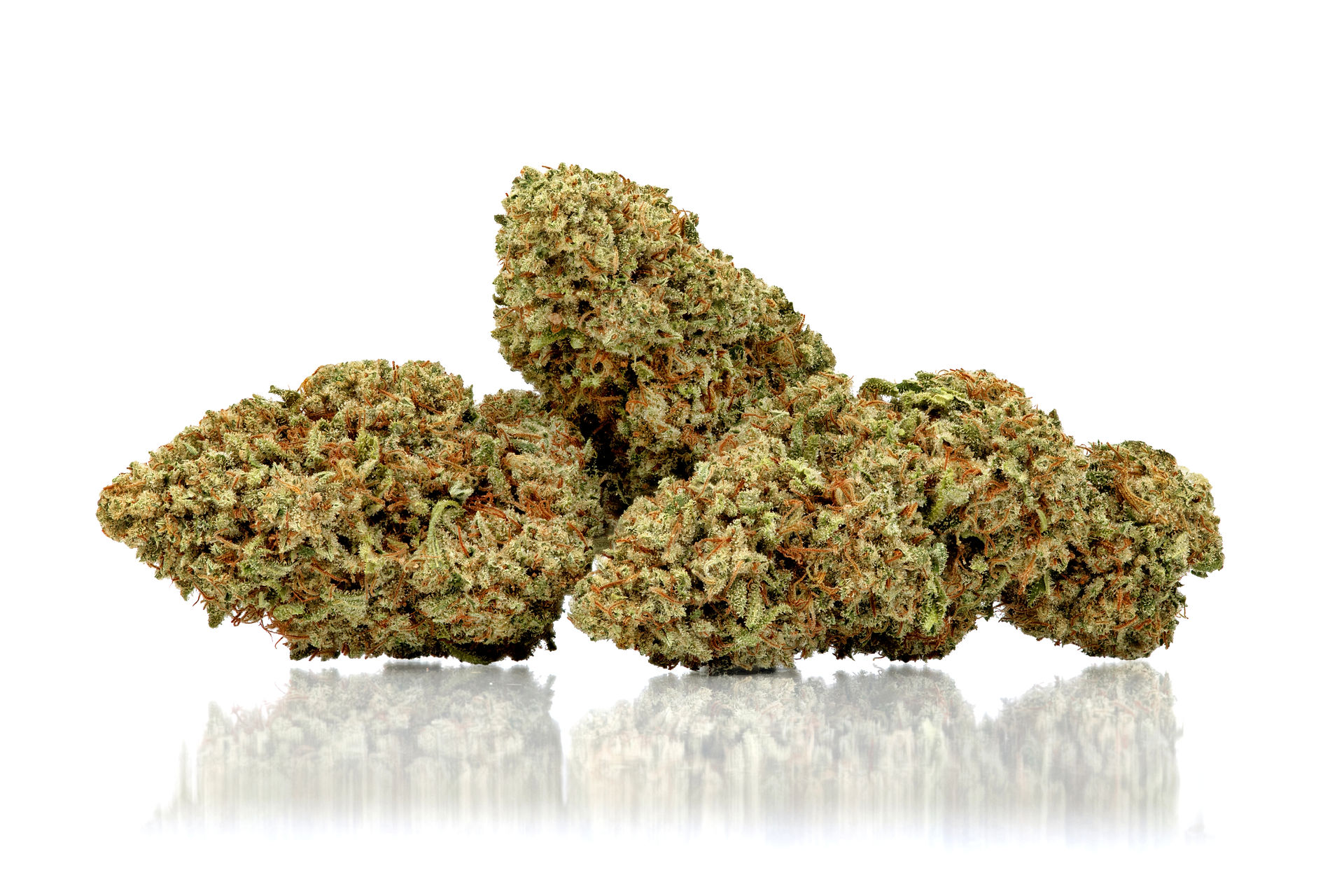
Step 5: Edit for speed, clarity, and compliance
Post-processing for Weedmaps & Leafly isn’t about crazy filters. It’s about:
Color correction so product looks true to life
Exposure balancing so details aren’t lost in shadows or highlights
Background cleanup (dust removal, scuffs, etc.)
Cropping to 1:1 with the subject nicely framed and not crowded
Exporting at optimized sizes so images load quickly on mobile
Remember all those stats: when 88% of consumers say product imagery is essential to online shopping decisions, slow or glitchy images are a direct leak in your funnel.
A pro will usually deliver:
A high-res master file (for web, print, ads)
One or more Weedmaps/Leafly-ready exports at recommended dimensions
Consistent file naming (e.g., brand-strain-product-type-thc-percentage.jpg)
That naming structure is helpful later when you sync from POS or reupload to other platforms.
Step 6: Upload, monitor, and iterate
Once you replace your old images:
Track menu views vs orders per SKU over the next 4–8 weeks
Watch which products see the biggest jump in conversion
Identify patterns: maybe concentrate macros outperform packaging-only shots, or flower images that show both jar and bud perform better than jar-only
Use those insights to:
Refine your shot list for the next batch of SKUs
Decide where to invest in more complex visuals (like 360 spins, lifestyle scenes, or animation for social)
5. Common Image Mistakes That Kill Weedmaps & Leafly Conversions
Even if you hire a pro, you’ll want to avoid these pitfalls:
❌ 5.1 No image at all or relying on generic brand art
Leafly requires at least one photo per brand product, and both platforms strongly recommend photos for menu items.
When a product tile has:
No image
A generic brand logo
A stock icon that doesn’t match the form factor
You’re asking a shopper to work harder to understand what they’re buying. Most won’t — they’ll just tap the product with the clear photo.
❌ 5.2 Dark, blurry, or busy images
This is the most common DIY issue:
Shot under mixed shop lighting
Background full of clutter
Phone flash creating harsh reflections on jars or mylar
Image looks soft or noisy when compressed
Those images silently communicate: “We didn’t put much care into this.” In a category where compliance, quality, and trust are already sensitive, that’s the wrong message.
❌ 5.3 Over-stylized or non-compliant concepts
Weedmaps and Leafly have content guidelines that restrict:
Depictions of consumption
Minors
Certain props or lifestyle imagery that imply over-consumption or unsafe use
Keep your menu images:
Product-first
Clean
Within platform rules (save more expressive lifestyle imagery for your own website and socials, where guidelines are different)
❌ 5.4 Inconsistent branding across SKUs
When different parts of your menu look like they were shot years apart, with different cameras and backgrounds, shoppers have a harder time recognizing:
Which SKUs belong to your house brand
Which products are new vs legacy
Which items pair together (e.g., flower + pre-rolls from same line)
Consistent art direction signals a mature, trustworthy brand and makes it easier for people to “collect” products across your catalog.
6. Why Professional Photography Is Especially Critical for Your Top SKUs


Let’s put some of those stats into a cannabis context.
If 75% of shoppers rely on product photos to decide what to buy, your best-selling eighth with no photo or a dim phone snap is working with a handicap compared to the competitor below you with crisp, professional images.
If high-quality images can boost conversions by up to 30–94% in general e-commerce, even a conservative 10–15% uplift on your top 20 SKUs can have a meaningful revenue impact.
Example (hypothetical, but realistic):
A top-selling cart does 300 orders/month at $40 average ticket → $12,000/month
You improve images + descriptions and see a 15% lift in conversion
That’s +45 orders/month, or $1,800 extra revenue/month from one SKU
Multiply that by several high-velocity products and the ROI on a professional photographer becomes straightforward.
You also gain:
Higher average order value – better images make it easier to upsell premium tiers
Reduced returns and complaints – products look like what the image promised
More repeat buyers – customers learn to trust what they see on your menu
7. Working With a Cannabis Photographer: Briefing Checklist
To get “conversion-ready” assets instead of just “pretty photos,” brief your photographer clearly. Here’s a checklist you can literally copy into an email.
Share with your photographer:
Platforms & specs
We need images optimized for Weedmaps and Leafly menus
Square crops (1:1), minimum 1200×1200 px, web-ready files for upload
Priority SKUs
List your Top 20–30 by revenue and order count
Note which are hero products (flagship lines, signature strains, in-house concentrates)
Brand guidelines
Colors, fonts, and any existing visual style
Preferences for background (pure white vs off-white vs brand color)
Compliance & use cases
Menu thumbnails
Hero images for brand pages
Potential use in ads, social, email, and website
Deliverables
High-res masters
Weedmaps/Leafly-ready files (cropped and compressed)
Consistent file naming by brand/strain/product type
A good cannabis photographer will also:
Ask about lighting style (clinical/clean vs warm/organic vs bold/colorful)
Suggest macro and detail shots for certain categories
Help you prioritize what to shoot now vs in a later phase as you see results
8. Putting It All Together (90-Day Action Plan)
If you want to see real movement in 90 days:
Month 1 – Foundation
Identify top SKUs from POS + Weedmaps/Leafly metrics
Hire a cannabis photographer for an initial top-20 SKU shoot
Replace existing menu images with new ones
Month 2 – Optimization
Monitor menu views vs orders for those SKUs
Tweak descriptions to support what the images show
Expand to the next 20–30 SKUs based on early wins
Month 3 – Scale
Lock in a visual style guide based on what’s working
Systematize process: every new SKU gets pro photography before launch
Explore advanced visuals: macro series, 360 spins, lifestyle for socials, and ad-specific assets
Over time, your Weedmaps and Leafly presence stops being “just a menu” and becomes a true visual storefront that sells for you 24/7.
Final Thoughts: Treat Your Weedmaps & Leafly Images Like Sales Assets
On Weedmaps and Leafly, your images aren’t decoration — they’re doing the work of a budtender, a brand ambassador, and a closer all at once. In a category where customers can’t touch, smell, or sample before buying, your product photography is the first and most influential signal of quality.
The brands that consistently win on menus aren’t guessing. They prioritize their highest-performing SKUs, invest in professional cannabis photography, and build a visual system that’s clean, compliant, and consistent across every product line. The result is less friction, higher confidence, and more conversions — especially on the products that already drive the majority of revenue.
You don’t need to overhaul your entire catalog overnight. Start with your top sellers. Replace weak or missing images with conversion-ready visuals. Measure the impact. Then scale what works. Over time, your Weedmaps and Leafly listings stop being static menus and start functioning as true digital storefronts that actively grow sales.
If you’re serious about improving menu performance, investing in professional cannabis product photography isn’t an aesthetic upgrade — it’s a measurable business decision.


Comments